
Coolle OBBS Studio Pro - Use Manual(4)
 Software Hub
2023-10-05
0 reviews
Software Hub
2023-10-05
0 reviews
3. How To Stream On Twitch With OBBS Studio
In this tutorial we’ll show you how to stream on twitch with OBBS Studio streaming software.
First of all, you need to download OBBS and install it. Then, follow the instructions below.
Best OBBS Settings For Twitch TV
In the first step you should get a twitch stream key for OBBS. You can find it in your Twitch dashboard (tab Stream Key).
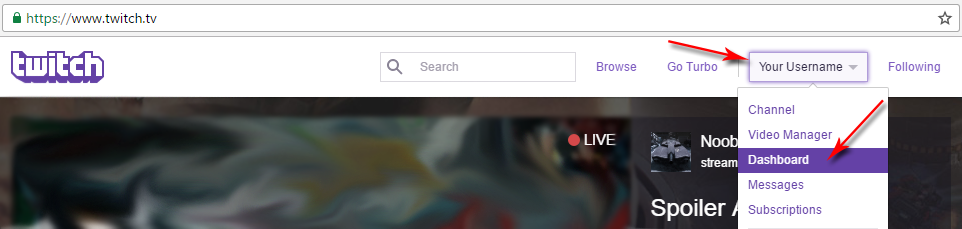
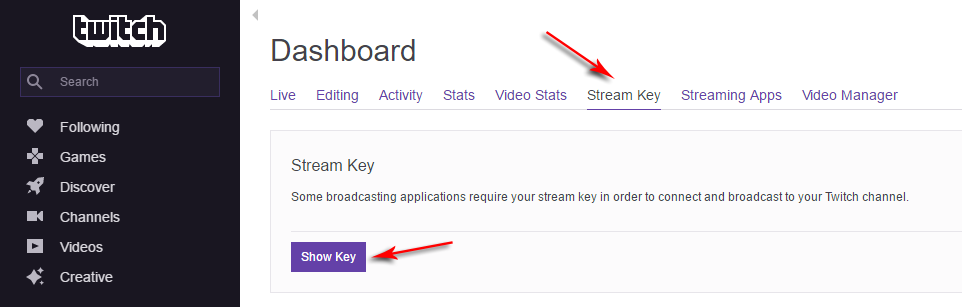
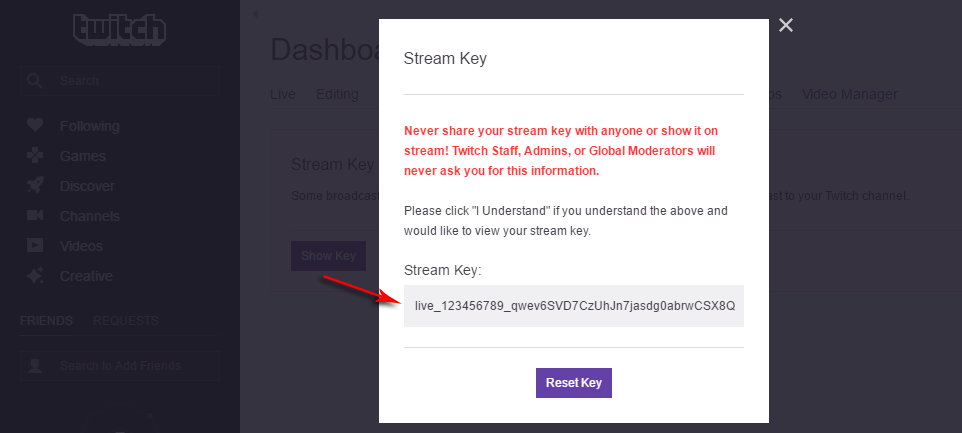
Then,
1. In OBBS Studio go to “File” → “Settings” → “Stream” and set “Stream Type” to “Streaming Services”
2. Choose “Service” → “Twitch”
3. Choose “Server” which is closest to your location
4. Enter “Stream key” which you’ve got in your dashboard on Twitch.TV
In the second step you should configure OBBS Studio for the best quality and performance. Twitch developers are recommending these settings:
1. Rate Control: CBR
2. Aspect ratio: 16:9 (that means you need to use resolutions such as 1920×1080, 1280×720, etc.)
3. Video bitrate (kb/s):
60fps
* 1080p: 6000
* 720p: 4500
30fps
* 1080p: 4500
* 720p: 3000
* 480p: 1500
4. Keyframe interval: 2
5. Audio: AAC with a bitrate 64-128 kb/s
Also it is worth mentioning advanced settings. You can use different encoders (x264, Intel QSV, Nvidia NVENC H.264, AMD AMF) and presets for them. For more information on this and for further instructions about scene setup you can read an article: how to setup OBBS Studio for streaming.
If this guide was useful, don’t forget to save a bookmark and share it in social networks.
- Next Post:Zip Extractor Pro - Tutorial
- Previous Post:X Live Wallpaper




- Support us by Donate
-
Inorder to keep our app free to all the uses, We need the support to continue work. And you will be appreciated.


- Search
-
- Support Us by Using Free Products
- Featured Products
- Recommend Articles


-
- The newest
- Hot
- Random












- Random tag
- Latest reviews
-
- Free PDF Converter 's comments:
"I just put together a full week of scroll-stopping branded social media content f"
- CoolleOffice中文版完整教程 's comments:
"Hi, I hope youre doing well! I’m reaching out to see if you’d be open to a li"
- X Live Wallpaper 's comments:
"THE FASTEST WAY TO CREATE, PUBLISH, PROFIT FROM EBOOKS… NO WRITING REQUIRED PRO"
- X Live Wallpaper 's comments:
"THE FASTEST WAY TO CREATE, PUBLISH, PROFIT FROM EBOOKS… NO WRITING REQUIRED htt"
- Full Tutorials for Coolle Offic 's comments:
- Friendly link